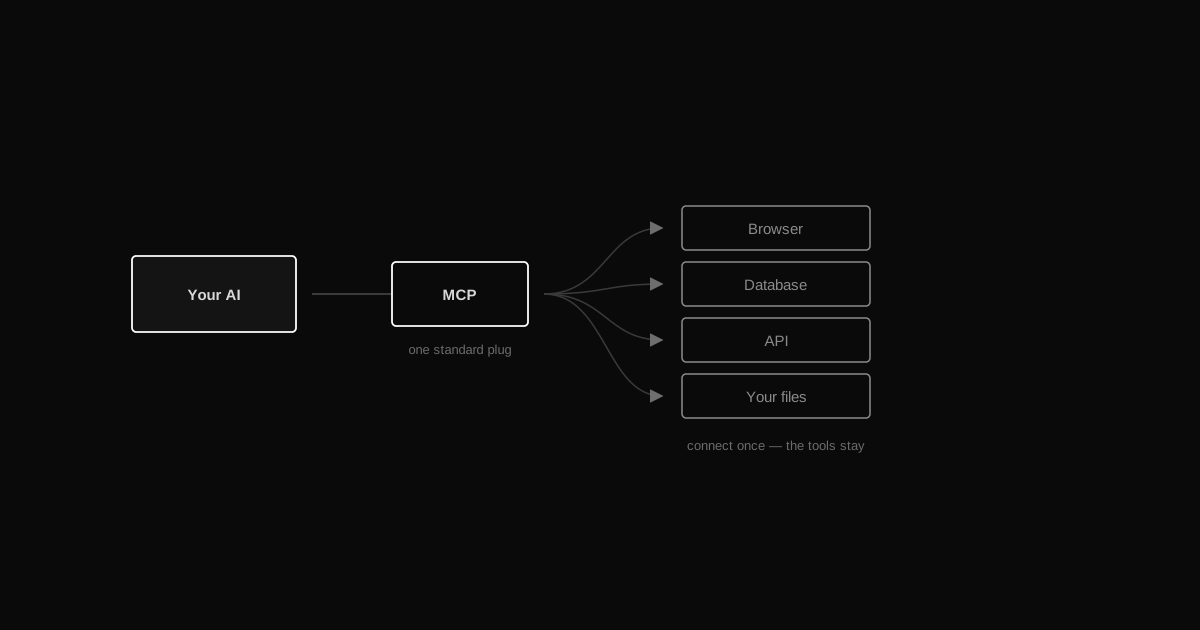
TL;DRMCP (Model Context Protocol) is a standard plug that lets your AI use outside tools — a browser, a database, an API. Connect a server once and the AI gains those tools for good. No custom integration, no code — just point it at the tool and talk.
…
What is MCP exactly?
An open standard (from Anthropic) that lets an AI assistant connect to external tools and data sources through one common protocol. Instead of every AI needing a custom integration for every tool, an MCP server describes what it can do once — and any MCP-compatible AI can use it.
Do I need to code to add an MCP server?
No. Most useful servers already exist — you install or point Claude Code at one with a single command, and the tools it exposes just show up. Building your own server is optional, and only needed for something nobody's built yet.
Which MCP servers should I try first?
A browser server (Claude can open pages and read what's on them) and a database server for whatever you already use cover most people's first real use case — checking your site or answering questions from your actual data.
Is it safe to connect my database or other tools?
Only if you trust the server and understand what it can do. Prefer read-only access when you can, never paste secrets into chat, and treat 'connect a tool' the same way you'd treat 'give someone access' — because that's exactly what it is.
Your AI is a genius trapped in a chat window — until you give it hands. It can write brilliant code but can't open your site to check it actually works. It can reason about your data but can't query your database. It knows what an API does but can't call one. MCP (Model Context Protocol) fixes that: an open standard that connects your AI to real tools and real data, so it stops talking and starts doing.
What is MCP, in plain terms?
MCP is a standard "plug." One side is your AI — Claude, in this case. The other side is an MCP server: a small program that wraps a tool or a data source (a browser, a database, an API, a design app, GitHub) and describes what it can do. Connect the two, and your AI instantly gains those abilities as tools it can call itself, mid-conversation — no copy-pasting results back and forth.
The point of a standard is that nobody builds this twice. Someone already built MCP servers for browsers, for databases, for GitHub, for design tools, for dozens of everyday things. You don't write an integration — you connect to one that already exists.
How do you actually add one?
Conceptually: you tell your AI tool about a server, and it shows up in the AI's toolbox from then on. In Claude Code, that's one line:
claude mcp add browser -- npx -y @modelcontextprotocol/server-playwright
That's it — no dashboard to configure, nothing to wire up by hand for most public servers. Restart, and Claude has a real tool: it can open a URL, click around, read the rendered page. Point it at a different server and it gains a different power — a database server gives it the ability to run queries, a GitHub server lets it open issues and read pull requests.
You can also just ask Claude directly: "What MCP servers exist for [my database / GitHub / a design tool]?" — it usually knows, and can walk you through adding one.
Three examples worth having on day one
A browser. Claude opens your actual site, clicks through it, reads the rendered page, and tells you what's broken — instead of guessing from the code alone.
A database. Point it at your database (read-only to start) and ask questions in plain language. Claude writes the query, runs it, and answers from your real data instead of guessing at your schema.
A service or API. GitHub, a project tracker, a design tool — Claude can open an issue, check a deploy, or move a file, not just describe how you'd do it.
Each one turns a "here's the code that should work" answer into a "let me check — yep, it works" answer.
What about safety?
Every server you add is real power over a real system. Before you connect one:
Only add servers you trust — the same bar as installing any other software.
Know the scope. A database server that can DELETE is very different from one that can only SELECT. Prefer read-only access where you can.
Never paste secrets into chat. Credentials belong in the server's own config, not in a prompt.
Start narrow. Connect the one tool the task in front of you actually needs — not everything you own, all at once.
Treat "connect an MCP server" exactly like "give someone access," because that's what it is.
Why this is the payoff
This is the moment your AI stops being a clever autocomplete and starts being a coworker who can actually check, actually run, and actually do things. A vault gives it memory. Rules give it judgment. MCP gives it hands. Once it can reach your real tools, "can you check if this works" stops being a question you answer yourself.
How this connects to the rest of the setup
MCP comes last because it's only worth having once the rest exists:
Your rules file decides which tool is allowed for which job, so it doesn't open a browser when it should read a note.
Skills call these tools as steps inside a packaged workflow.
Subagents get the same tools, so delegated work can actually touch your systems instead of reporting back opinions.
Whatever a tool returns that's worth keeping goes into the vault and memory, and shows up in the graph next time.
That's all seven pieces. The full setup is how they become one system.
 AI FROM MY POV